Friday, June 14, 2013
Today I have 3 tags using Amy's Marie's PTU kit Cascade. This kit is gorgeous and so versatile. The colors and elements are amazing. You can find this kit and all her others at her brand new store! She is having a moving in special right now, so head on over and get some GREAT deals! :)
Tag #1
I am using the amazing artwork of Alex Prihodko. You need a license in order to use this tube. You can purchase the tube and obtain a license at PFD.

*click image for full view*
Tag #2
I am using the gorgeous artwork of Barbara Jensen. You need a license to use this tube. You may purchase this tube and so many others and obtain a license at her store HERE

*click image for full view*
Tag #3
I used the artwork for Verymany on this tag. You need a license to use this tube. You may purchase this tube and obtain a license from SATC.

*click image for full view*
Here are your Snags. Leave some love if you take them please! :)


Happy PSPing!

Tuesday, June 11, 2013
One more CT tag and Snags using Amy Marie's PTU kit Aquatic Beauty. It can only be found at SATC.
I am using the artwork of Elias Chatzoudis which you need a license to use. You may purchase tubes and obtain your license HERE

*Click on tag to get full image*
If you take my snags please leave some love! :)


Happy PSPing!
These two tags are bot made using Amy Marie's kit Aquatic Beauty. This kit is a gorgeous ocean kit. You can find this kit Exclusively at SATC. The first tag I used the beautiful artwork of Alex Prihodko which you need a license to do so. You can find this tube and obtain a license at PFD

*click tag for full preview*
Here are your snags! Leave some love if you take them!


2 CT tag using Aquatic Beauty. This one is using the artwork of Nicole Brune.
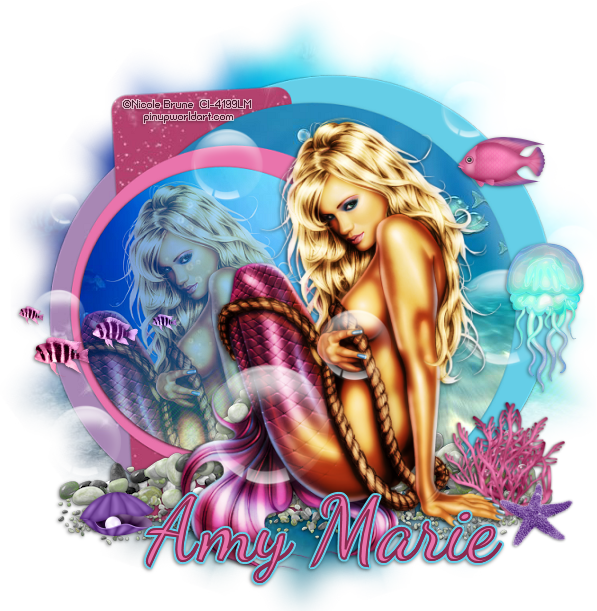
*click tag for full preview*
Thursday, June 6, 2013
I have a few tags today using Jackie's Jewels kit Lakeside Retreat. Her kits are on sale until the 15th of June for only $1 at the Pimpin' PSPers Warehouse! To get this kit and all of her other awesome kits go HERE
Tag #1

*click on tag for full view*
Here are your snags, please leave a comment if you snag them!


Tag #2 Using the Cluster Frame Freebie

*click tag for full view*
Here is your cluster frame freebie-

Download HERE
Wednesday, June 5, 2013
Here is a CT tag done using the art Eugene Rzhevskii which you need a license to use. You can get the license and a lot of awesome tubes at PFD HERE

*click image for full view*
I am using the kit Simply Spring by Karra's Kreative Korner. I LOVE this kit and have made you a cluster frame freebie. Please leave some love if you choose to download it! Visit Karra's blog to see where she is selling this and all her amazing other kits! HERE

Download available HERE
And here are the snags:


Monday, June 3, 2013
Tag Show off using Alex Prihodko's new tube Summer and Jackie's Jewels kit Toes In The Sand.
Jackie's kits are all on sale for only $1 until the 15th so hurry and gets them HERE

*click on tag for full view*
Friday, May 31, 2013
I have a new tutorial for you today using Amy Marie's kit O Spring. This kit is gorgeous! Very versatile! You can get the kit at SATC

*Click Tag For Full Image*
What you will need
Tube of Choice- I am using a tube by Jessica Dougherty which I purchased from CILM
Mask Of Choice I used a mask by Wee Scott Lass
This tutorial was written by me, Natalie, on May 31st 2013. This tutorial is of my own creation. Any similarities is just a coincidence.
You must have a working knowledge of PSP. I use PSP 9 but I'm sure any other version will work as well.
Remember to save often.
Ready? Let's do this!
Open new image 600x600
transparent background
Copy and paste Element 26. Resize to your liking. Add drop shadow.
Copy/ Paste tube of your choice, move to the left of your frame.
Open Paper 14- Copy/paste and move to under the frame. Using your magic wand click inside the frame, selection, modify by 5. Invert delete paper 14.
Duplicate tube, put inside of frame just like you did your paper. Lower opacity to 60.
Open Element 41. Resize to liking. Add drop shadow. Move over to left side. Duplicate and move to the right side.
Open, Copy/paste element 12. Resize to your liking. Add drop shadow. Place in the lower right corner.
Duplicate, mirror, and move to left corner, in front of the tube.
Open, copy/paste element 11. Resize, add drop shadow, and place by element 12. See tag for placement. Duplicate, and move to the left side.
Open, copy/paste element 29. Resize to your liking. move to the bottom of the tag, place in the middle. Make sure it's the very top layer. Duplicate twice, move those to the very bottom layer, and move one to the right side, and one to the left side.
Open, copy/paste element 47. Resize to your liking. Add drop shadow. Move to bottom layer. Move to bottom left corner. Look at tag for reference.
Duplicate, mirror, and move to the left side of the tag so it looks the same on both sides.
Open copy/paste element 50. Resize, add drop shadow. Place in front of the leaves you just placed. See tag for reference.
Duplicate, and move to the left side again, so it matches the right side.
Open paper 14 again, copy/paste and move all the way to the bottom layer. Open your choice of mask. go to layer> New Mask Layer> From Image. Click the down arrow and choose your mask image. Click OK. Delete mask layer, and then merge group.
Add copyright and name and you are done.
Thank you for trying my tutorial!
Subscribe to:
Posts
(Atom)
Grab My Blinkie

Proud Mod



I CT For


Awesome Blogs